 aivideo
 Synthesia Review
avatar based Updated 2026-09-25
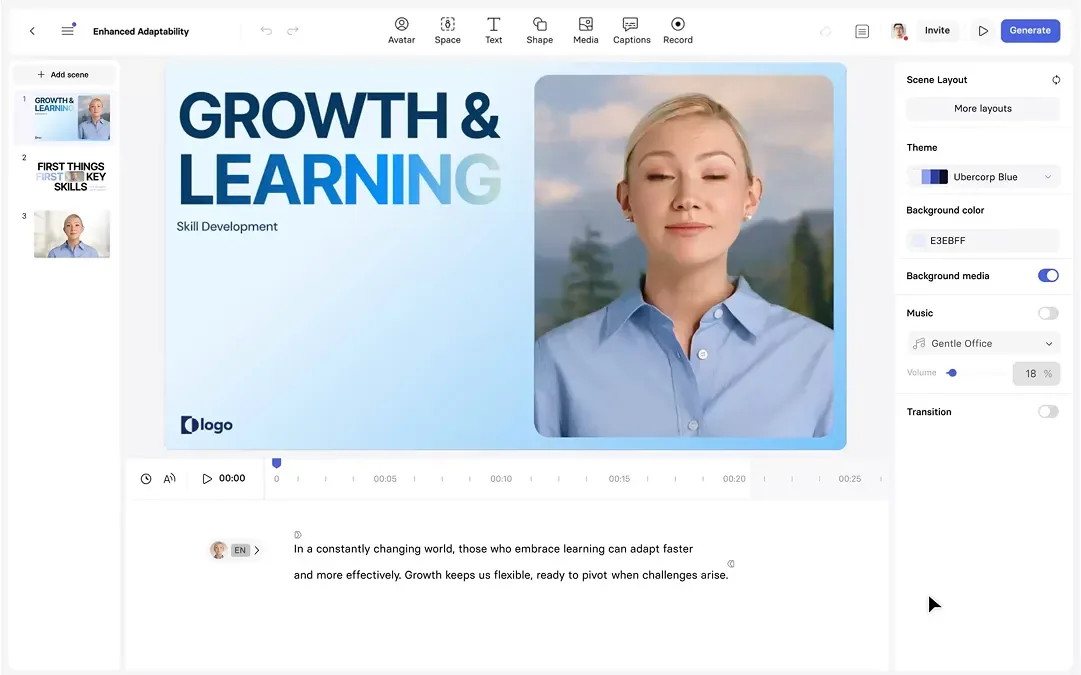
Synthesia is the market-leading AI avatar video platform. Instead of recording yourself on camera, you type a script, pick an AI presenter (or a custom avatar of yourself), and Synthesia generates a talking-head video in minutes.
It's built for teams that need professional-looking video at scale — corporate training, onboarding, product explainers and marketing — without the cost of a studio, crew or actors. The headline numbers are strong: 240 avatars, 160+ languages with lip-sync, custom avatars, voice cloning and a clean API.
It's also one of the pricier options, which is why it earns 9.2/10 for quality but isn't the right fit for everyone. In this review we break down pricing, the features that actually matter, and who should (and shouldn't) pay for Synthesia.
The fastest way to decide is to try Synthesia free →
Best for
- Corporate training and L&D (its core use case)
- Employee onboarding at scale
- Marketing and product explainer videos
- Teams that want a custom avatar of their own spokesperson
- Companies that need an API to generate video programmatically
Pricing explained
Synthesia has four tiers. The free Basic plan lets you test the editor but is limited — treat it as a trial, not a production plan. Starter ($29/mo, or $18/mo billed annually) is the entry point for individuals and small teams. Creator ($89/mo, or $64/mo annually) is where most teams land, with more minutes and features. Enterprise is custom-priced for larger organizations with SSO, security and compliance needs.
Two things matter more than the sticker price: annual billing cuts the monthly rate by roughly 30%, and Synthesia is credit-based, so your monthly minutes — not the plan name — determine the real cost. Estimate your volume before choosing Starter versus Creator.
On price overall, Synthesia is the premium option. If you’re a solo creator or on a tight budget, Fliki (from $28/mo), HeyGen (from $29/mo) and Elai (from $29/mo) cover much of the same ground for less.
Features deep-dive
Avatars (240 stock + custom). Most people choose Synthesia for avatar quality. Its 240 stock avatars are widely considered the most realistic in the category, and you can build a custom avatar of yourself (or a colleague) so your videos feature a consistent, branded presenter. Custom avatars are the differentiator for teams that want to scale content without filming every time.
160+ languages with lip-sync. Synthesia matches the script’s language to the avatar’s mouth movements, so a single script can be localized into 160+ languages. For global companies this is the killer feature: one video, translated and re-voiced for every market.
Voice cloning. You can clone a real voice so the AI presenter sounds like a specific person — useful for keeping a consistent brand voice.
Resolution and watermark. Output is 1080p and watermark-free on paid plans, which matters when these videos represent your brand.
Integrations (PowerPoint, YouTube, LMS). Turn a PowerPoint into a narrated video, publish straight to YouTube, and export content for LMS and training platforms.
API. A strong API lets you generate video programmatically — the key reason Synthesia wins for product teams and platforms that need video at scale.
What’s missing. Editing is basic. Synthesia isn’t a full video editor (no timeline-based editing like Descript or Veed); it’s for creating avatar-led explainers. If you need heavy post-production, pair it with a proper editor.
Who should use it (and who shouldn’t)
Use Synthesia if you’re a business producing training, onboarding or marketing video at scale, need multiple languages, and want the most polished avatars. The custom-avatar + API combination is hard to beat for teams.
Skip it if you’re a solo creator on a budget (Fliki or HeyGen cost less), need a full editor (Descript or Veed), or only make a couple of videos a month — the premium is hard to justify at low volume.
Alternatives
- HeyGen — comparable avatar quality, viral templates, cheaper upper tiers. Pick it for social-style videos.
- Fliki — entry point is ~30% cheaper, with great TTS and blog-to-video. Pick it for faceless YouTube or voiceovers.
- Elai — corporate-training focus like Synthesia, at a lower price. Pick it for L&D on a budget.
- Runway — pick it if you want generative text-to-video rather than an avatar talking head.
What to test before you pay
This review is based on verified public data — pricing pages and feature docs — as of September 2026, not an exhaustive hands-on test. Synthesia’s value hinges on a few things you can only confirm in the free tier, so check these first:
- Avatar realism. Generate a 30-second clip and watch the mouth on tricky words — names, numbers, technical terms. This is where avatars fall apart or shine.
- Lip-sync across languages. Render the same script in two or three languages and check the mouth matches the audio. Localization is only worth the premium if it actually holds up.
- Custom avatar (the differentiator). If this is your reason to pay, check the setup time and approval process — it isn’t instant, and it’s the premium feature.
- Voice cloning. Clone a real voice and compare it against the original for naturalness before committing.
- Credit math. Generate one real video and measure how many minutes/credits it consumes. This — not the plan name — decides Starter vs Creator.
- Editing limits. Try to tweak the output. If you need real cuts, confirm you’ll pair it with Descript or Veed rather than fighting the built-in editor.
Verdict
Synthesia is the premium choice for teams that need realistic AI avatars, global languages and scale. It’s not cheap, and it’s not an editor — but for corporate video at volume, it’s the benchmark. If that’s your use case, try it free and see if the avatar quality justifies the price.
Pricing
Free tier available| Plan | Monthly | Annual (per month) |
|---|---|---|
| Basic | $0 | $0 |
| Starter | $29 | $18 |
| Creator | $89 | $64 |
| Enterprise | Custom | Custom |
Key specs
- Max video lengthCredit-based
- Avatars240 · custom supported
- Languages160
- Voice cloningYes
- Resolution1080p
- Watermark-freeYes
- APIYes
- IntegrationsPowerPoint, YouTube, LMS
Pros & cons
Pros
- Most realistic avatars
- 160+ languages
- Strong API
Cons
- Expensive
- Limited editing
FAQ
Is Synthesia worth it?
For businesses producing training or marketing videos at scale, yes — the avatar quality, 160+ languages and API justify the premium. For solo creators on a budget, cheaper tools like Fliki or HeyGen cover most of the same needs.
Does Synthesia have a free version?
Yes — a free Basic plan for testing the platform. It's limited, so treat it as a trial rather than a production plan.
What's the cheapest Synthesia alternative?
Fliki ($28/mo), HeyGen ($29/mo) and Elai ($29/mo) all start below Synthesia's Starter plan, and each has a free tier.
Can I use my own avatar in Synthesia?
Yes — custom avatars are supported, so you can create a presenter that looks like you (or a colleague) for branded videos.
How many languages does Synthesia support?
160+ languages, with lip-sync that matches the avatar's mouth to the script.
Compare Synthesia
Affiliate link — we may earn a commission at no extra cost to you.