 aivideo
 Kapwing Review
video editing Updated 2026-09-25
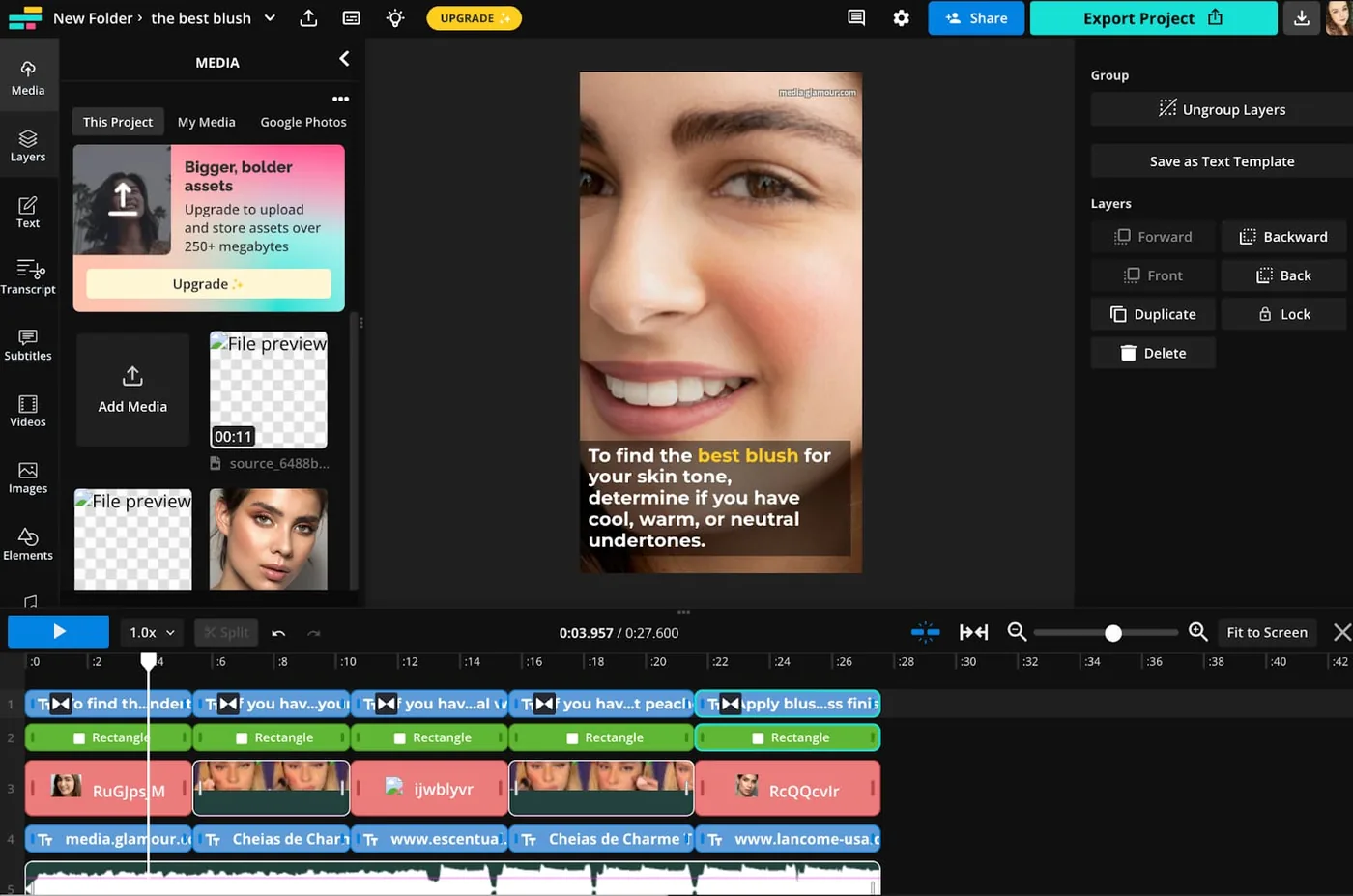
Kapwing is a browser-based video editor built around speed and accessibility. There's nothing to install — you open a tab, upload or paste a link, and edit in the browser. Its headline features are AI subtitles, AI dubbing and a genuinely generous free tier.
It isn't an AI avatar platform like Synthesia or HeyGen, and it doesn't try to be one. Kapwing is for creators and teams who need to edit video, add captions and localize content fast — repurposing clips for social media is where it shines.
At $24/mo for the paid Pro tier (free tier available), it's competitively priced for what it does. In this review we break down pricing, the features that actually matter, and who should (and shouldn't) use Kapwing.
The fastest way to decide is to try Kapwing free →
Best for
- Repurposing long videos into captioned social clips
- Auto-subtitling and AI dubbing in 40+ languages
- Teams that need a shared, no-install editor
- Fast edits on a browser without learning timeline software
- Creators who want a real free tier before paying
Pricing explained
Kapwing has four tiers. The Free plan is the standout — it’s genuinely usable, unlike most free tiers in this category, but exports top out at 720p and carry a watermark. Pro ($24/mo, or $16/mo billed annually) removes the watermark, unlocks 4K and adds more storage and AI minutes. Business ($64/mo, or $50/mo annually) is aimed at teams with shared workspaces and brand kits. Enterprise is custom-priced.
Two things matter most: the free tier is real (test everything before paying), and annual billing cuts Pro by roughly a third. At $16–24/mo, Kapwing undercuts most dedicated editors while covering captions, dubbing and editing in one place.
Features deep-dive
Browser-based editing. No install, no render farm on your machine — the heavy lifting happens in the cloud. You can paste a link and start editing in seconds, which makes it the fastest tool in this list to try.
AI subtitles and captions. Auto-generated captions are the flagship feature, with 40+ languages and the styling you need for social. It’s a genuine best-in-class caption workflow for a browser editor.
AI dubbing and voice cloning. Translate and re-voice a video into 40+ languages, and clone a voice to keep a consistent brand sound. Strong for localizing one video into many markets.
Resolution and watermark. Paid plans export up to 4K watermark-free; the free tier is 720p and watermarked. That’s the main thing that pushes most people to Pro.
What’s missing. No AI avatars — this is an editor, not a talking-head generator. And while an API exists, the documentation isn’t clearly published, so programmatic use is harder to evaluate than Synthesia’s or Runway’s.
Who should use it (and who shouldn’t)
Use Kapwing if you edit in the browser, need fast captions and dubbing, or want a free tier you can actually use before paying. It’s the pick for social-media repurposing and quick team edits.
Skip it if you specifically need AI avatars (Synthesia or HeyGen), a transcript- first editing model (Descript), or heavy template-driven production (InVideo).
Alternatives
- Veed — the closest browser-editor rival, also strong on captions and dubbing. Pick it for a similar workflow with a slightly different feature mix.
- Descript — edit video by editing the transcript. Pick it for podcast and spoken-word content.
- InVideo — template-driven editing at a lower entry price. Pick it for marketing videos from templates.
- Synthesia / HeyGen — if what you actually want is an AI presenter, these are the avatar leaders, not editors.
Verdict
Kapwing is the best browser-first editor in this lineup for captions, dubbing and fast social repurposing, with a free tier you can genuinely use. It’s not an avatar tool, and the free tier’s 720p/watermark limits will push serious users to Pro — but at $24/mo it’s fair value for what it does. If your workflow is “edit, caption, localize, post,” try it free and see how far the free tier gets you.
Pricing
Free tier available| Plan | Monthly | Annual (per month) |
|---|---|---|
| Free | $0 | $0 |
| Pro | $24 | $16 |
| Business | $64 | $50 |
| Enterprise | Custom | Custom |
Key specs
- Max video length120 min
- Avatars
- Languages40
- Voice cloningYes
- Resolution4k
- Watermark-freeYes
- APIYes
- IntegrationsNot published
Pros & cons
Pros
- Generous free tier
- Strong AI subtitles/dubbing
- 40+ language localization
Cons
- No AI avatars
- Free tier 720p/watermarked
- No published API docs
FAQ
Is Kapwing free?
Yes — Kapwing has a genuinely generous free tier, but exports are limited to 720p and carry a watermark. The $24/mo Pro plan removes the watermark and unlocks 4K.
Does Kapwing have AI avatars?
No. Kapwing is a video editor, not an avatar generator. For AI presenters, look at Synthesia, HeyGen or Colossyan instead.
How many languages does Kapwing support?
40+ languages for its AI subtitles and dubbing, which is strong for a browser editor — though below the 120–175 of dedicated avatar tools.
What's the best Kapwing alternative?
Veed is the closest browser-editor rival (also strong on captions), Descript if you edit by transcript, and InVideo if you want template-driven editing.
Can I edit video in my browser without installing anything?
Yes — that's Kapwing's whole pitch. It runs in the browser, so there's no software to download or timeline software to learn.
Compare Kapwing
Affiliate link — we may earn a commission at no extra cost to you.