 aivideo
 Descript Review
video editing Updated 2026-09-25
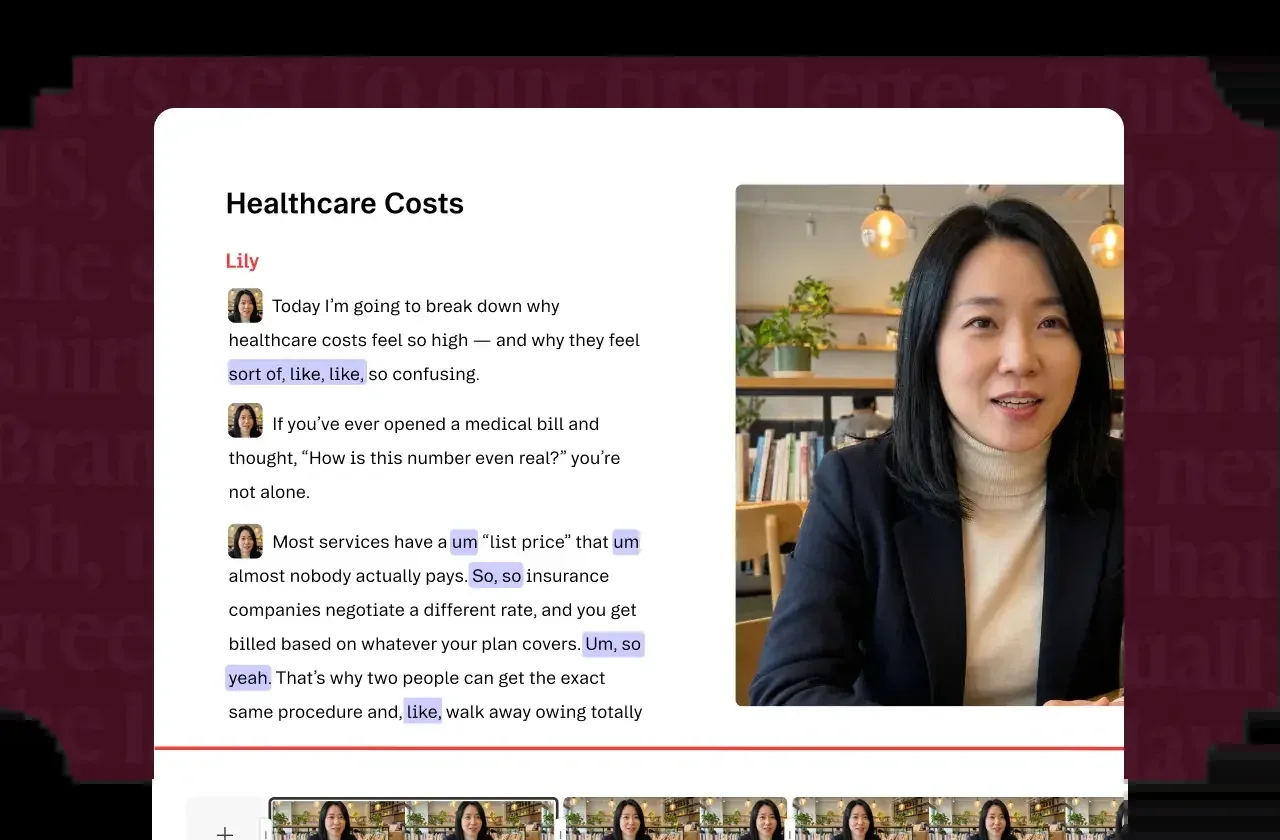
Descript is a video and podcast editor built around a single idea: edit the transcript, not the timeline. You edit your video by editing the text — delete a sentence and the matching video cuts automatically.
The headline: text-based editing, Overdub voice cloning, screen recording and a podcast-first workflow. It's aimed at podcasters, video creators and anyone who thinks in words rather than frames.
It earns 8.2/10 — a genuinely different editing experience, though it has a steeper learning curve and limited avatars. Here's the full breakdown.
The fastest way to decide is to try Descript free →
Best for
- Podcast editing (its core use case)
- Text-based video editing
- Screen recordings and quick explainers
- Creators who want to fix audio without re-recording
- Teams that edit collaboratively
Pricing explained
Descript has five tiers. Free lets you test the platform. Hobbyist ($24/mo, or $16/mo annually) is the entry point. Creator ($35/mo, or $24/mo annually) is where most creators land. Business ($65/mo, or $50/mo annually) adds team and collaboration features. Enterprise is custom.
Annual billing saves about a third — Creator drops from $35 to $24, Hobbyist from $24 to $16. The trade-off is that Descript charges more than basic editors, reflecting its unique transcript-based workflow. It’s worth it if you edit podcasts or talking-head video regularly; less so for occasional clips.
Features deep-dive
Text-based editing (the core). Edit your video by editing the transcript. Delete a word and the video cuts to match — a fundamentally faster way to work for talking-head and podcast content.
Overdub voice cloning. Clone your voice, then type new words and Descript generates them in your voice. Fix a flubbed sentence without re-recording.
Podcast-first. Built for podcasters, with transcript editing, filler-word removal and studio-quality audio tools.
Screen recording. Built-in screen recording makes Descript handy for quick explainers and tutorials.
35 avatars (limited). There are some AI avatars and custom avatars, but the selection is small — Descript is an editor first, not an avatar platform.
What’s missing. The learning curve is steeper than a simple template editor, and the avatar selection is limited. It’s not a talking-head generator in the way Synthesia or HeyGen are.
Who should use it (and who shouldn’t)
Use Descript if you edit podcasts or talking-head video and want the transcript-based workflow and Overdub voice cloning. It’s the pick for creators who think in words.
Skip it if you need AI avatars (Synthesia or HeyGen), a simpler template editor (InVideo or Veed), or just want quick captioned clips — the learning curve may not be worth it for light use.
Alternatives
- Veed — pick it for browser-based editing with best-in-class auto captions.
- Kapwing — pick it for a simpler browser editor with strong subtitles and a generous free tier.
- Synthesia — pick it for AI avatars and corporate training.
- InVideo — pick it for cheap, template-driven edits.
Verdict
Descript is a genuinely different editor: edit the transcript, and the video follows. For podcasters and talking-head creators, the text-based workflow and Overdub voice cloning earn 8.2/10. The learning curve is real and the avatars are limited — but if you cut podcast or interview content, Descript is worth the switch. Start free and move to Creator when you hit the limits.
Pricing
Free tier available| Plan | Monthly | Annual (per month) |
|---|---|---|
| Free | $0 | $0 |
| Hobbyist | $24 | $16 |
| Creator | $35 | $24 |
| Business | $65 | $50 |
| Enterprise | Custom | Custom |
Key specs
- Max video lengthCredit-based
- Avatars35 · custom supported
- Languages30
- Voice cloningYes
- Resolution4k
- Watermark-freeYes
- APINo
- IntegrationsZoom, Slack, Adobe
Pros & cons
Pros
- Text-based editing
- Overdub voice cloning
- Podcast-first
Cons
- Limited avatar selection
- Steeper learning curve
FAQ
Is Descript worth it?
For podcasters and creators who want to edit by editing text, yes — the transcript-based workflow is a real time-saver. For AI avatars, it's the wrong tool.
Does Descript have a free plan?
Yes, a free tier for testing. Paid plans unlock full features and watermark-free output.
How much does Descript cost?
Hobbyist is $24/mo ($16/mo annually), Creator is $35/mo ($24/mo annually), and Business is $65/mo ($50/mo annually). There's also a free tier and custom Enterprise pricing.
What is Descript's Overdub?
Overdub is voice cloning — you can type new words and Descript generates them in your own voice to fix a sentence without re-recording.
Is Descript good for podcasts?
Yes — Descript is podcast-first, with transcript editing, filler-word removal and studio-quality audio tools built in.
Compare Descript
Affiliate link — we may earn a commission at no extra cost to you.